A Logo Turtle Cheat Sheet for My Daughter
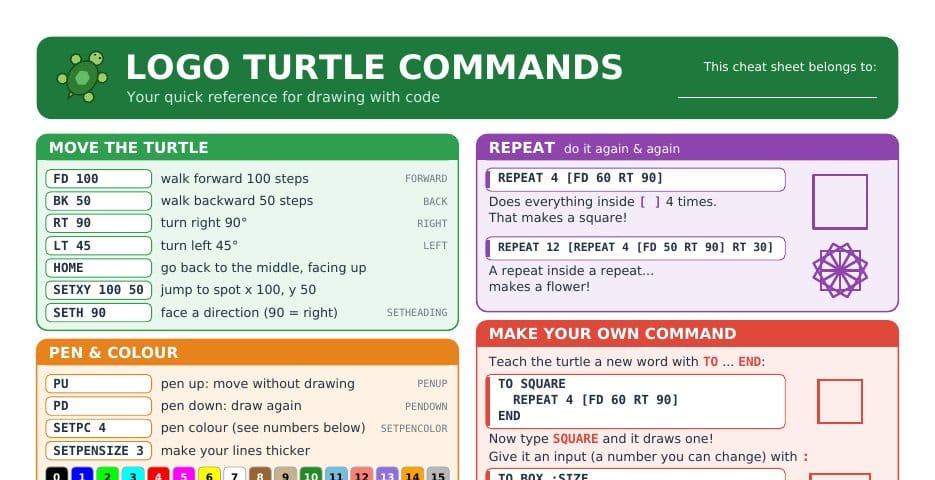
My daughter has been learning Logo. If you are around my age you might remember it: a little turtle in the middle of the screen, and you tell it where to walk. FD 100. RT 90. Do that four times and you have a square. Do it with a different number and you have a triangle, or a star, or a mess.
The mess is the good part. But the mess gets frustrating when you can't remember whether it's SETPC or SETPENCOLOR, or why the turtle stopped drawing. (Pen up. It's always pen up.) So I made her a one-page cheat sheet to keep beside the keyboard.
Download the Logo turtle cheat sheet (PDF, letter size)
What's on it
I tried to write it the way a kid would want it explained. Not "rotates the turtle clockwise by n degrees" but "turn right 90°". Every command has its short name, the long name in small print, and a plain-words description.
- Move the turtle: forward, back, turning, going home, jumping to a spot.
- Pen and colour: pen up, pen down, the sixteen colour numbers, thicker lines.
- Which way is the turtle facing: a little compass, because 0 is up and 90 is right and that is not obvious to anyone the first time.
- Repeat: the square, then a repeat inside a repeat that makes a flower.
- Make your own command:
TO SQUARE ... END, then the same thing with an input so you can draw a box any size. - Variables, maths and choices:
MAKE,RANDOM,IFandIFELSE. - Shape magic: the turn is 360 divided by the number of sides. Triangle, square, pentagon, hexagon, octagon, circle, star.
- Bug-busting tips: put a space between words and numbers, every
[needs a], and if nothing is drawing, tryPDandST.
There's a "try this" challenge too: draw a house, then add a door, then make the roof red. And a line at the top for her to write her name, because a cheat sheet that belongs to you is a different thing from a cheat sheet.
Why Logo still works
Logo is older than I am, and it still teaches the big ideas better than almost anything. Loops. Functions. Variables. Breaking a big drawing into small named pieces. And it gives you instant, honest feedback. You type a thing and the turtle does exactly that thing, which is very often not what you meant.
That gap between what you said and what you meant is most of programming. It's a nice thing to meet when you're young, with a turtle, and the worst outcome is a wonky star.
The sheet should work in most versions of Logo: Turtle Academy in the browser, UCBLogo, FMSLogo and others. A few command names differ between versions, so check your Logo's help if one doesn't work. Print it, stick it on the wall, let your kid scribble on it. That's what it's for.